

For students of Tribhuvan University (TU) enrolled in the Bachelor of Business Studies (BBS) program, awaiting exam results can be a period of anxious anticipation. Whether you are in your first, second, third, or final year, knowing how to efficiently access your results is essential. This article provides a detailed guide on checking your BBS results online through the official TU exam site and the Colleges Nepal website.
Understanding Tribhuvan University and the BBS Program
Tribhuvan University, established in 1959, is the oldest and largest university in Nepal. It offers a wide range of undergraduate and postgraduate programs. Among these, the Bachelor of Business Studies (BBS) is a popular choice for students aspiring to build careers in business and management. The BBS program is structured to provide students with a solid foundation in business principles, including accounting, finance, marketing, and management.
Importance of Checking Results Online
In today’s digital age, checking exam results online is convenient and time-saving. Tribhuvan University, in collaboration with various educational platforms like Colleges Nepal, has made it easy for students to access their results from anywhere. This method not only reduces the hassle of visiting the university in person but also ensures that students receive their results promptly.

Step-by-Step Guide to Checking BBS Results
Here’s how you can check your BBS results online:
Visit the TU Exam Site:
- Open your web browser and go to TU Exam Site.
- This is the official website for Tribhuvan University exam results.
Navigate to the Result Section:
- On the homepage, look for the “View Result” section.
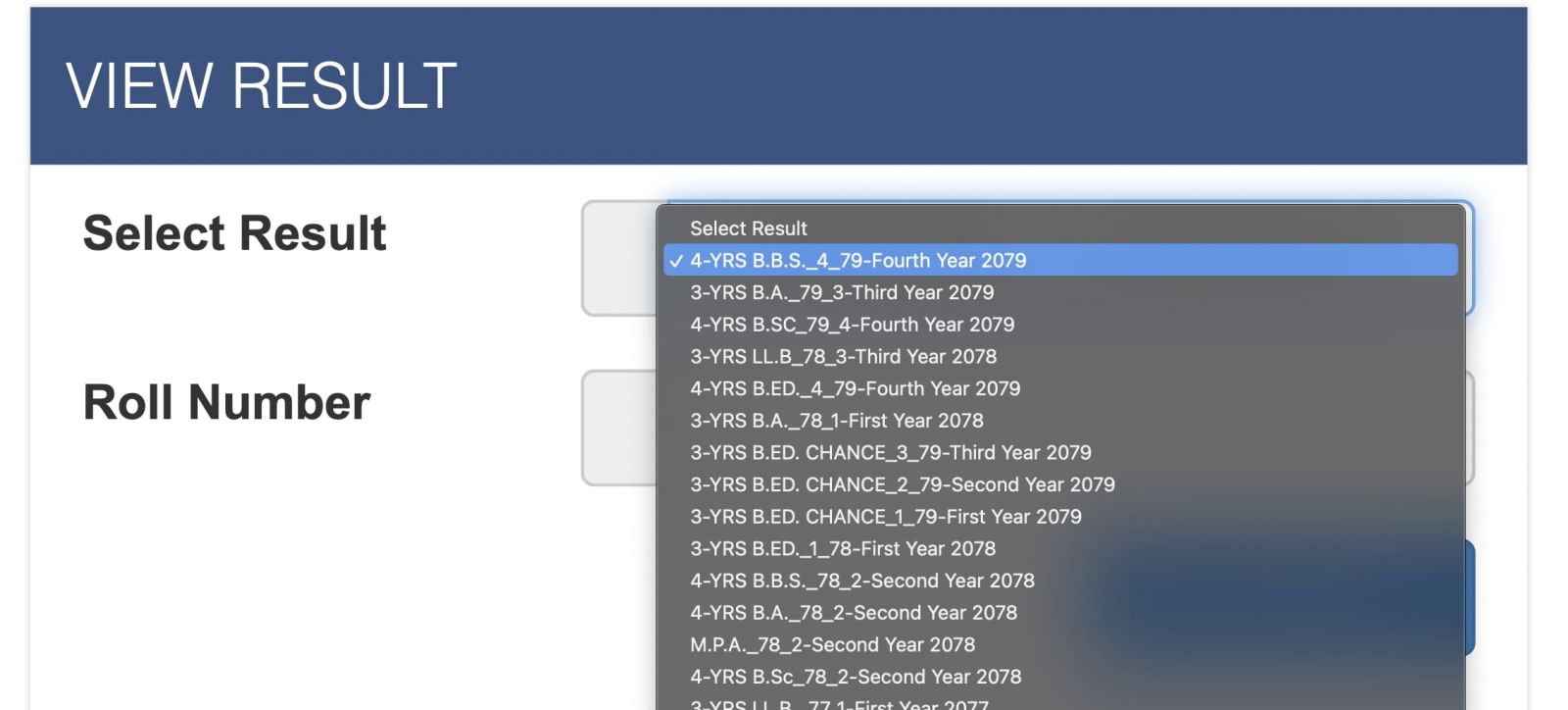
- This section is usually prominently displayed, making it easy to find.
Select Your Examination Year:
- Click on the link corresponding to your BBS examination year (e.g., BBS 4th Year).
- This will direct you to the result page for the specific year you are interested in.
Enter Your Roll Number:
- You will be prompted to enter your exam roll number.
- Ensure that you enter the correct roll number to avoid any discrepancies in the result.
View Your Result:
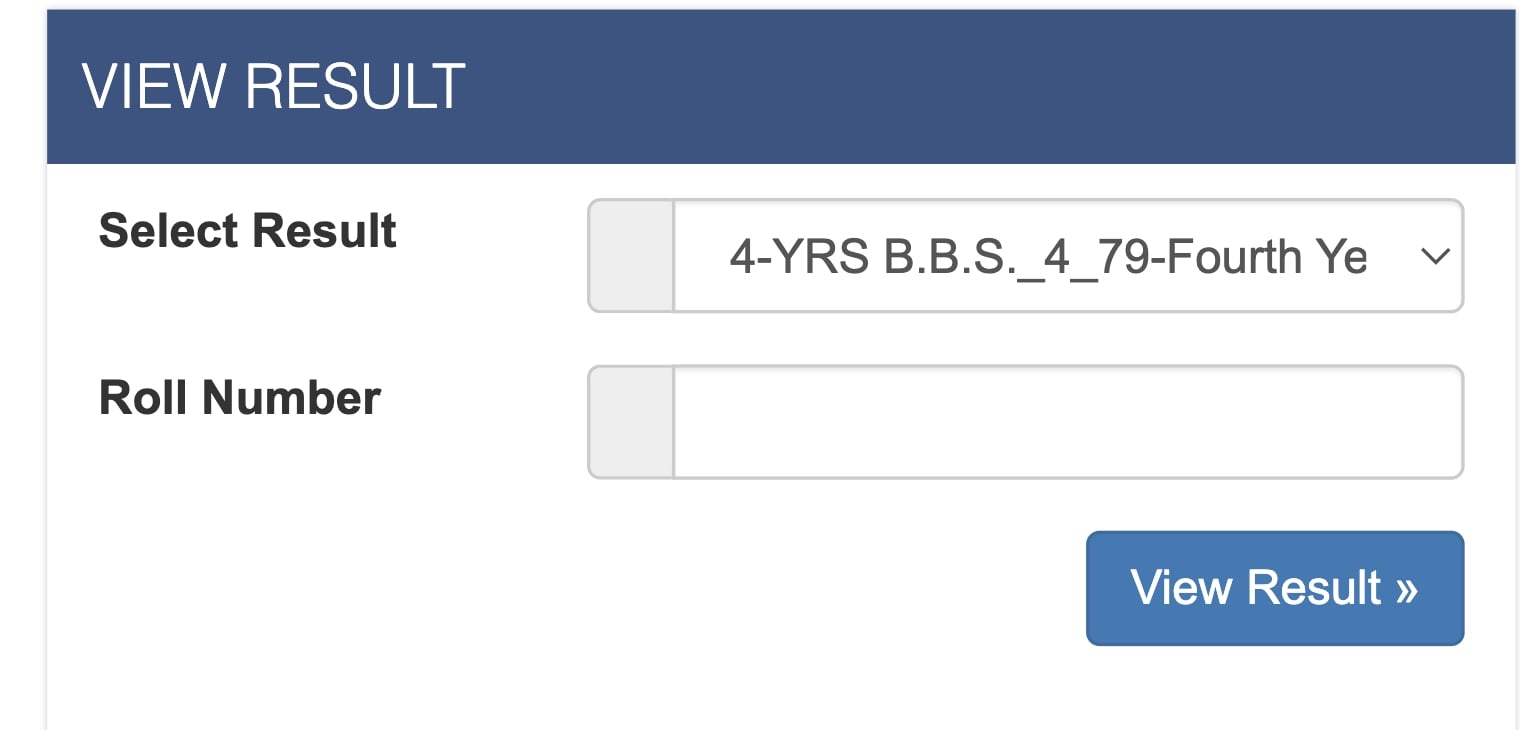
- After entering your roll number, click on the “View Result” button.
- Your result will be displayed on the screen.
- You can print or save the result for future reference.
Accessing Results on Colleges Nepal
In addition to the official TU website, results can also be accessed on the Colleges Nepal website. Colleges Nepal is a comprehensive educational portal that provides information about colleges, courses, and exam results in Nepal. Here’s how you can use it:
- Visit the Colleges Nepal Website:
Go to the Colleges Nepal results page.
- Find the BBS Results Section:
Look for the BBS results link or section.
- Follow the Same Steps:
Similar to the TU site, you will need to select your year and enter your roll number to view your results.
Tips for a Smooth Experience
- Ensure Internet Connectivity: Make sure you have a stable internet connection to avoid interruptions while checking your results.
- Keep Your Roll Number Handy: Double-check your roll number before entering it on the website to ensure accuracy.
- Print or Save Your Result: Once your result is displayed, print or save it as a PDF for your records. This will be useful for future reference or in case you need to present your results for job applications or further studies.
Frequently Asked Questions (FAQs)
What should I do if I encounter an error while checking my result?
If you encounter an error, first ensure that your internet connection is stable and that you have entered the correct roll number. If the problem persists, try refreshing the page or accessing the site during off-peak hours when there is likely to be less traffic.
Can I check the results for previous years?
Yes, the TU exam site and Colleges Nepal often archive past results. You can navigate to the respective year’s section to access previous results.
What if I have lost my roll number?
If you have lost your roll number, you should contact your college administrator. They can provide you with the necessary information to retrieve your roll number.
Checking your BBS results online is a straightforward process that saves time and effort. By following the steps outlined above, you can easily access your results and take the next steps in your academic or professional journey. Remember to visit the official TU exam site or Colleges Nepal for the most accurate and up-to-date information.
Read Also;