



The Secondary Education Examination (SEE) results for Class 10 are crucial for students in Nepal, marking their transition to higher secondary education. Here’s everything you need to know about checking your SEE Class 10 Result 2081.

Key Highlights:
- Exam Name: Secondary Education Examination (SEE) 2081
- Session: BS 2080-2081
- Exam Date: Chaitra 2080 BS (March-April 2024)
- Result Mode: Online
- Result Date: Asar 31, 2081 (July 15, 2024)
- Result Links: see.gov.np/results & see.ntc.net.np
Result Announcement
The SEE results for Class 10 are announced today, Asar 31, 2081 (July 15, 2024). Students have been eagerly waiting for this moment, and the results are now available online and via SMS and IVR systems.

How to Check Your Result
1. Online:
- National Examination Board’s Official Website: Students can directly visit the board’s official website at see.gov.np to view their results.
- Nepal Telecom’s Website: Another reliable source to check the results is Nepal Telecom’s dedicated page for SEE results at see.ntc.net.np.
Steps:
- Visit either see.gov.np/results or see.ntc.net.np.
- Click on the “Results” or “10 results” link.
- Enter your symbol number and date of birth.
- Click “submit” to view your result.
- Download and print for future reference.
2. Via SMS:

- General SMS Service: Students can send an SMS to get their results. Simply type “see” followed by a space and then your symbol number. Send this message to 1600.
- Nepal Telecom SMS Service: Alternatively, students using Nepal Telecom can also send their symbol number after typing “see” to 1601 to receive their results.
Steps:
- Send “SEE [symbol number]” to 1600.
- Alternatively, use Sparrow SMS by sending “SEE [symbol number]” to 35001.
3. IVR System:
- Dial 1600 from PSTN, CDMA phones, or landlines.
- Follow the voice instructions to retrieve your result.
SEE Grading System
The SEE has a grading system to provide a clearer understanding of students’ academic performance. Here’s a breakdown:
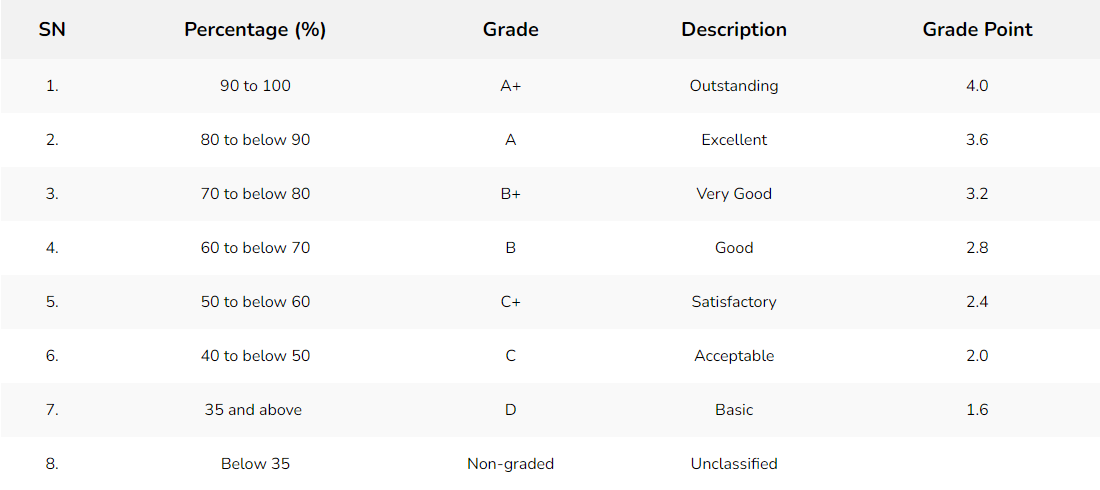
Important Notes:
- Students with NG in 2 subjects can participate in the SEE grade increment exam.
- Those with NG in more than 3 subjects will need to reappear for the exam next year for those subjects.
Stay tuned for more updates on the SEE Class 10 results. Ensure you keep checking our website for the latest information.
SEE Class 10 Examination 2081: Detailed Statistics and Updates
The National Examination Board (NEB) oversees the Secondary Education Examination (SEE) and plays a pivotal role in Nepal’s secondary education system. Here are some vital statistics and updates following the Class 10 examinations:
Participation and Examination Centers:
- Total Students: Approximately 500,000 students took the SEE examination this year.
- Examination Centers: The exams were conducted across 2,000 centers throughout the country.
Grade Increment Examination:
- Participants: Over 60,000 students participated in the grade increment examination this year, indicating a significant number of students aiming to improve their grades.
Mark Entry and Grade Sheet Distribution:
- The NEB has completed the process of entering and registering students’ marks.
- Students must achieve a minimum of 35% marks in the theoretical component of each subject to be eligible to receive their grade sheet.
SEE Class 10 Results 2081: Detailed Statistics
The SEE results for Class 10 have been released. Here’s a breakdown of the results:
Overall Pass Percentage:
- 52.5% of students have successfully passed the SEE examinations.
Total Participation:
- Regular Exam Students: A total of 450,000 students participated in the regular exam.
- Examinations Cancelled: The examinations of 100 students have been cancelled for unspecified reasons.
Performance Breakdown:
- Excellent (GPA 3.61 to 4): 8,500 students achieved this grade, showcasing outstanding performance.
- Very Good (GPA 3.21 to 3.60): 45,000 students fall into this category, reflecting a very good grasp of their subjects.
- Good (GPA 2.81 to 3.20): 75,000 students achieved this grade, indicating a good understanding of their coursework.
Comparison with Previous Year:
- Grade Sheet Achievement: Last year, 50% of SEE students received their grade sheet, highlighting the challenges faced by many in meeting the board’s criteria.
Revised Grading Guidelines
The SEE has made amendments to the letter grading guidelines to be more accommodating to students:
- Now, if a student receives an NG (Not Graded) in a subject, they are only required to retake the exam for that specific subject to improve their grade.
- This is a significant change from the previous rule where students with NG in more than two subjects had to retake exams for all those subjects the following year.
The SEE’s efforts to streamline the examination process and make grading guidelines more student-friendly are commendable. These changes aim to provide students with better opportunities to enhance their academic performance and reduce the burden of retaking multiple subjects. As always, it’s essential for students to stay updated with the latest guidelines and criteria set by the board.
FAQs
How can I check my SEE Class 10 Result online?
You can check your SEE Class 10 Result online by visiting the official SEE website at see.gov.np or Nepal Telecom’s dedicated page at see.ntc.net.np. Enter your symbol number and date of birth to view your result.
What is the SMS code to check SEE Class 10 Result?
To check your result via SMS, type “SEE [symbol number]” and send it to 1600. Alternatively, you can use Sparrow SMS by sending “SEE [symbol number]” to 35001.
How do I check my SEE Class 10 Result through IVR?
Dial 1600 from PSTN, CDMA phones, or landlines and follow the voice instructions to retrieve your result.
What is the minimum passing grade for SEE Class 10?
The minimum passing grade for SEE Class 10 is a “D” which corresponds to a grade point of 1.6.
What should I do if I receive an NG in a subject?
If you receive an NG in a subject, you are required to retake the exam for that specific subject to improve your grade. If you have NG in more than two subjects, you will need to retake the exams for all those subjects the following year.
Can I participate in the grade increment exam if I have NG in two subjects?
Yes, students with NG in up to two subjects can participate in the SEE grade increment exam to improve their grades.